
Integrate ADscan into your platform
How a pentest or PTaaS platform runs ADscan at a client site and ingests the results. There is no API to call. Your runner starts adscan ci and your dashboard reads versioned JSON files with a published schema.
ADscan has no API for your platform to call today. Integration is a command and the files it writes. Your runner starts adscan ci at the client site, the run writes JSON into its workspace, and your dashboard ingests those files. ADscan's own Enterprise platform drives the engine the same way.
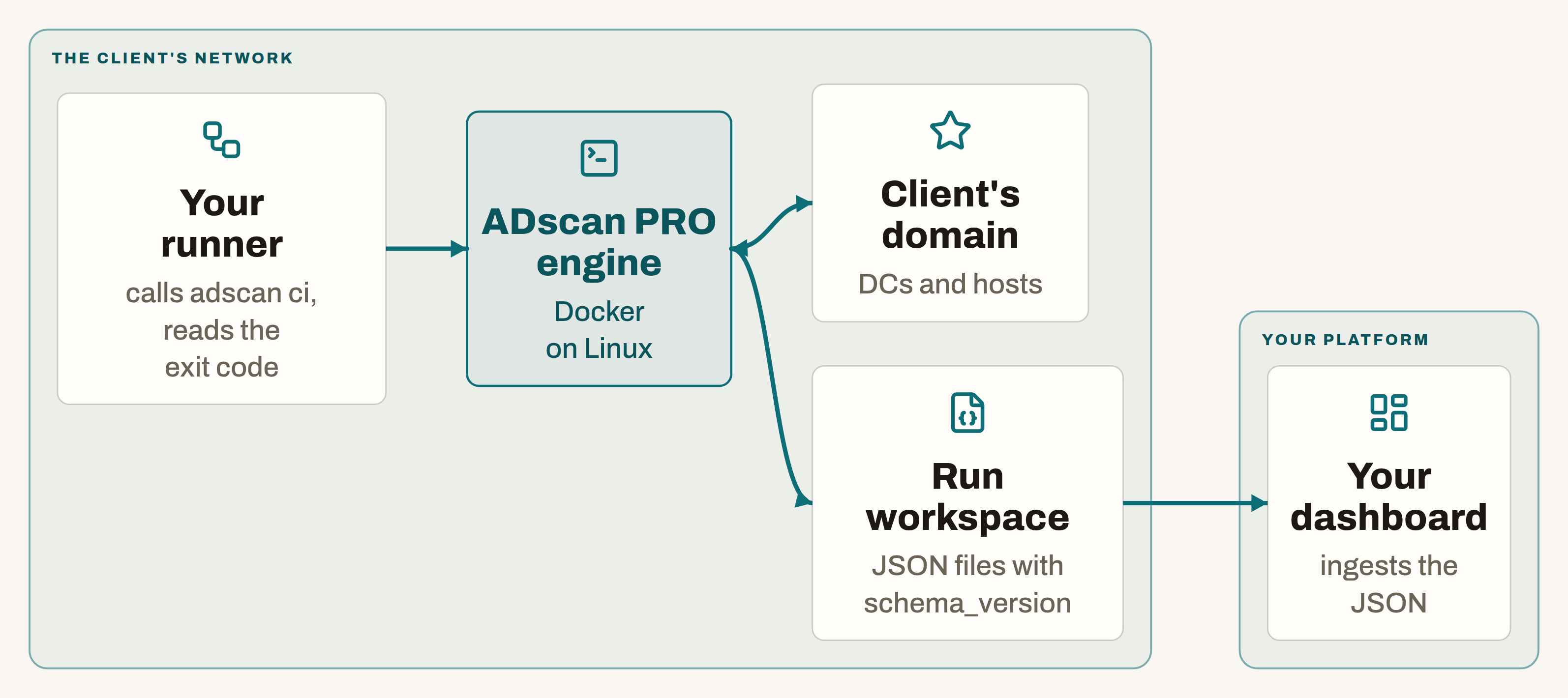
This page is for the engineers who build that runner and that ingestion. The commercial side, the partner (OEM) terms, is on For consultancies, MSSPs and platforms.
Run the engine from your runner
The engine runs in Docker on a Linux host that can reach the client's domain controllers. It needs the same ports as the Enterprise appliance, listed in Segmented networks. adscan ci is a PRO command. On the free edition it exits with 42 and runs nothing.
adscan ci --offline \
  auth --policy audit \
  --domain corp.example --dc-ip 192.0.2.10 \
  -u svc_scan -p '<secret>' \
  --workspace corp-example-2026q4
Activate the PRO licence on a new runner once, with adscan license activate --key-file <file>, and every later run reuses it (adscan license). Pick the policy with care. Under --policy audit, adscan ci runs the validation steps, reverts every change it can, verifies each rollback, and flags anything it cannot undo. It also starts Broadcast Name Poisoning by default when the scan begins, answering LLMNR, NBT-NS and mDNS lookups on the client network to capture authentication attempts. With --interface, it poisons on that interface only. Without --interface, it poisons on every interface with an Active Directory segment behind it, meaning one that can receive callbacks and routes an in-scope domain host. If none qualifies, it skips poisoning and prints a warning. Set ADSCAN_NO_POISONING=1 before the run, or set poisoning.enabled to false in --scan-config, to keep poisoning off. The production-sensitive policy maps attack paths and executes nothing, poisoning included. Scan policies has the detail, and the adscan ci reference lists every flag.
Pass the client's scope as data. From 15.0.0 a scan configuration can carry an asset_scope section with an allow list, a deny list and the domain controller setting. A section that is present replaces the scope recorded in the workspace, and an empty one clears it, so write it on every run to keep the workspace in step with what your platform shows. A mistake in an entry ends the run with exit code 2 before anything is sent. After the run, scope.json in the workspace says how each entry resolved and what was left alone because of it. Engagement scope for hosts and accounts has the entry formats and the rules.
A stopped run can be picked up. Start adscan ci again with the same --workspace, the same domain, the same account and the same engagement scope, and it resumes the interrupted scan instead of starting over. Running ci again on the same workspace lists the cases that start clean.
Give each client its own workspace. ci keeps the workspace when the run ends, so your ingestion can read it. The workspace holds the credentials the scan collected, so delete it once you have ingested what you need (workspace delete <name> in the ADscan shell). Do not pass --ephemeral before your ingestion has run, because that deletes the workspace when the run ends.
Read the exit code
The exit code says how the run went. It never says whether the domain has findings, so a domain full of attack paths and a clean one both end in 0.
| Code | What happened | What your runner does |
|---|---|---|
0 | The scan completed. | Ingest the workspace. |
3 | The assessment is incomplete. Directory collection or attack-path discovery did not complete for the target domain, a stage stopped because the machine ran short of memory, or the scan was stopped with one Ctrl+C or a stop request. coverage.json declares what was not assessed. No client report is rendered. | Do not show the domain as clean. Record the run as incomplete. Run it again on the same workspace to resume. |
4 | The scan completed and its results are in the workspace. The report it was asked for did not render. | Ingest the workspace. Render the report again with adscan deliver if you need it. |
42 | Free edition. Nothing ran. | Fix the install. |
78 | Nothing ran, because the licence refused a new assessment. license_refusal.json beside the run says why. | Activate or restore the licence. See Licence server connection. |
128 + N | The process was ended by signal N without a clean stop (143 SIGTERM, 130 a second Ctrl+C). | Record the run as stopped. |
Codes 1 and 2 (a failure, or a configuration refused before the scan) are in the adscan ci reference.
The files a run writes
Each file below has a format version and a published JSON Schema (draft 2020-12). The versions in this list come from the engine's own registry of formats.
technical_report.json· version2.1· schema technical_report.v2.jsonPer domain, the findings with severity and status, the control evidence, the run events, attack-path coverage, the exposure score, choke points and the compliance mapping per framework. At the root, the engagement timeline and every change ADscan made in the directory, with its reversal.
domains/<domain>/attack_graph.json· version1.2· schema attack_graph.v1.jsonThe domain as a graph. Users, groups, computers, certificate templates and the other objects as nodes, and each relationship or attack step as an edge with its technique and evidence.
domains/<domain>/attack_paths_snapshot.json· version1.0· schema attack_paths_snapshot.v1.jsonThe attack paths computed for the domain.
environment_changes.json· version1.1· schema environment_changes.v1.jsonThe ledger of every change ADscan made in the directory during the run, and whether it was reverted and the reversal confirmed.
scan_summary.json· version1.0· schema scan_summary.v1.jsonOne small record written when the scan reaches its end. Compromise status, attack-path count, duration, time to compromise and engine version.
domains/<domain>/inventory/*.json· versioninventory-1.0· schema inventory.v1.jsonThe directory inventory. Users, computers, groups, GPOs, trusts, AD CS and the other collections, one file each.
domains/<domain>/memberships.json· versionmembership-1.0· schema memberships.v1.jsonThe group membership snapshot of the domain.
domains/<domain>/users.json· version1.0· schema unauth_users.v1.jsonThe user list an unauthenticated run builds. It is a JSON array, so it has a schema and no version marker until the next major version.
Two details save ingestion work. technical_report.json and every attack_graph.json carry coverage_run_id, the id of the run that wrote them, so you can tell which run a file came from. Neither file holds a recovered password, hash or key. A credential appears as a fingerprint, so a secret shared by several accounts shows up as one fingerprint you can group on.
Download a real sample
These two files are what an unattended adscan ci --policy audit run wrote against essos.local in GOAD, a public lab. They are not a client's data. The only change is the workspace name inside the file paths the run recorded. Both validate against the schema next to them.
| Sample | Written as | Validates against |
|---|---|---|
| technical_report.json | schema_version 2.1 | technical_report.v2.json |
| attack_graph.json | schema_version 1.2 | attack_graph.v1.json |
A real client domain writes a much larger attack graph than this lab.
Versioning and deprecation
Every file carries a schema_version marker at its root, <major>.<minor>. The inventory and membership files keep the prefixes they always had (inventory-1.0, membership-1.0). The unauthenticated user list is a JSON array, so it has a schema and no marker yet.
- A minor version only adds. A new optional field, a new block, a new value in an open list. The schema of that major is updated in place and still validates every older minor, so a reader built for the major keeps working.
- A major version can break. A field removed, renamed or retyped, a meaning changed, an optional field made required. It ships a new schema file (
technical_report.v3.jsonaftertechnical_report.v2.json), and the previous major's schema stays in the package for two minor engine releases or 90 days, whichever is longer. - Every format change is announced. Each release lists it in the "Output format" section of its notes on the changelog, one line per file, marked additive or breaking.
Write your reader for one major. Accept every minor of it, and ignore fields you do not recognise. Comparing the marker for equality with one exact value would throw away a valid file the day a minor version adds a field.
The schemas ship with the engine from the first release after 14.0.0, in adscan_core/engagement/schemas/. A scan_summary.json without schema_version was written by 14.0.0 or earlier.
Webhooks from the Enterprise platform
The Enterprise platform also pushes its own events, as they happen, to any system that accepts a webhook. A partner platform that runs adscan ci still reads the files above; webhooks are how a team that runs the Enterprise console feeds its SIEM, SOAR or ticketing tool.
- Body. One JSON object per event, contract
adscan.webhook_event/1, schema webhook_event.v1.json. A field added within major 1 is optional, so a reader of an earlier 1.x keeps working. - Signature.
X-ADscan-Signature-256: sha256=<hex>is the HMAC-SHA256 of the exact body with the webhook's secret. Verify it on every attempt. - Deduplication.
event_idis the same for every attempt of the same fact and is repeated in theIdempotency-Keyheader. Deduplicate on it. - Retries. Up to five attempts with exponential backoff. Redirects are not followed.
- Outbound policy. On the appliance, a destination the outbound policy blocks is never attempted. The delivery log and the console show it as blocked by policy, with what to change.
- Secrets. No payload carries a password, hash, key or ticket. A new credential event names the account and how it was obtained.
Offline runs
--offline turns off the calls ADscan makes on its own, which are telemetry, the version check, wordlist and Windows tool downloads and online hash lookups. It does not turn off the licence channel. Every online PRO licence checks in at each start and registers each forest it assesses by a one-way code, and a partner licence also reports, when a scan ends, the size of each domain as counts (user accounts, computers, domain controllers and certificate authorities, and with an engagement scope the computers it keeps in, leaves out or could not place), with no name in them. What PRO sends lists every field for each kind of licence, and it is the page to hand to a client's security review. Two network steps stay explicit and are yours to schedule. The first run pulls the engine image if it is not on the host yet, and adscan update fetches a newer release. The scan itself still talks to the client's domain controllers and hosts, which is the point of the run.
Licence
adscan ci needs PRO. Building it into a product you sell needs partner (OEM) terms, agreed before you build. The free CLI is source-available under the Business Source License 1.1, which does not cover a hosted or embedded product that competes with the paid version.
Runners without internet access
A runner at a client site with no route to ADscan relays the licence requests through a file that your platform forwards, or runs under an offline licence issued for that engagement. Both are described on adscan license. Which one fits is part of the partner terms, and we go through it with your engineers on the first call.
How a run maps to billing
This is the method. Prices are in the partner terms.
- With ADscan 15.1.0 or later, one assessment is one client forest, with all of its domains in scope. It counts at the first run whose directory read succeeds, and its assessment window opens there. Re-running the forest inside the window is part of that assessment. A run that fails or is stopped before the directory read succeeds counts for nothing. An older engine counts the forest when it is registered.
- The engine reports to the licence server every run whose directory read succeeds, whatever the environment. Under your partner terms, runs in your own lab and tests before your first client are not billed. You and ADscan exclude them when you reconcile your usage together.
- ADscan takes a share of what you bill your client for the AD service, never of your whole contract. The share is in the partner terms.
- If you sell AD testing inside a bundle, the AD part gets a reference price, agreed up front by domain size.
- You pay after you bill your client, and billing never stops a run.
Guest SMB sessions
How ADscan checks for guest access over SMB, the adscan- name a client's logs will show for those sign-ins, and why that name cannot lock an account.
GPO Abuse — Immediate Scheduled Task
Plant a SYSTEM-level Immediate Scheduled Task on every machine linked to a writable GPO, and roll it back cleanly.