Your Active Directory data never leaves your network.
ADscan is built for regulated environments where data sovereignty is not negotiable. It runs entirely on-premise, with no agents. By default the Enterprise appliance makes no outbound connection. The Community and PRO command-line tools send pseudonymized usage telemetry, which you can switch off.
Frameworks the report maps to.
Built for environments where trust is earned, not assumed.
Every architectural decision answers one question first: can this expose the customer's environment? The answer is designed to be no, by construction rather than by policy.
100% on-premises
Every scan on the appliance runs in offline mode with telemetry off, and the console has no setting to change that. Updates are off by default. If your administrator turns them on, the appliance downloads signed releases from ADscan's registry and sends no scan data. Notifications go only to the email, chat or webhook destinations your administrator sets. Scan traffic, credentials, findings and reports stay inside your perimeter.
Transparent telemetry
The Enterprise appliance sends none. The Community and PRO command-line tools send usage and diagnostic telemetry, including sanitized, pseudonymized terminal output, on by default. Domains, IPs, hostnames, usernames, SIDs and hash material are replaced with deterministic pseudonyms before upload, and the upload is aborted if that step fails. On PRO it is also linked to your licence, by the licence and seat identifiers we issue, so we can support you. It never carries a name or an email address. Turn it off with set telemetry off global (every workspace) or set telemetry off (current workspace), ADSCAN_TELEMETRY=0, --no-telemetry or --offline. None of them turns off the PRO licence check or domain registration, which are part of the licence.
No agents required
ADscan runs from one Linux host inside Docker and reaches your domain over the network. Nothing is installed on endpoints, domain controllers, or servers, and no Windows machine is required anywhere.
Two-step console sign-in
Every web console account can add a second sign-in step with codes from an authenticator app, and the codes work without an internet connection. Each user also gets one-time recovery codes in case the device is lost. Enrolment, the use of a recovery code and a rejected code all go to the audit log.
Offline license support
Deployments without internet access are supported. The Enterprise licence is a signed file checked on the appliance itself, and updates can be installed by uploading a signed package.
Operator confirmation
Every exploitation step requires explicit operator confirmation. ADscan never autonomously modifies AD objects, user accounts, or group policies.
Verified reversion
ADscan cleans up every change it makes during an assessment, and it proves the undo with a confirming re-read. A revert call that returns success is not proof; only a re-read that confirms the object is back to its original state counts as done. When a revert cannot be verified, it is reported as pending manual cleanup, naming the exact object, and never marked as done. Durable AD objects are operator-confirmed at exit; transient artifacts are auto-reverted. You always know what was touched and what remains.
Data sovereignty
All assessment data, findings, and reports are generated and stored locally. You control what is shared, and with whom.
The tool fits AD audits like a glove. It speeds up and simplifies the work a great deal, and there is always very detailed traceability of everything, which I think is one of the best things about it.
Inside your network, under your key, with nothing going out by default.
The Enterprise platform runs as an appliance on your own infrastructure. By default the Enterprise appliance makes no outbound connection. Each line below is a property we verify on the appliance image itself, on the machine and in a packet capture, before it is delivered.
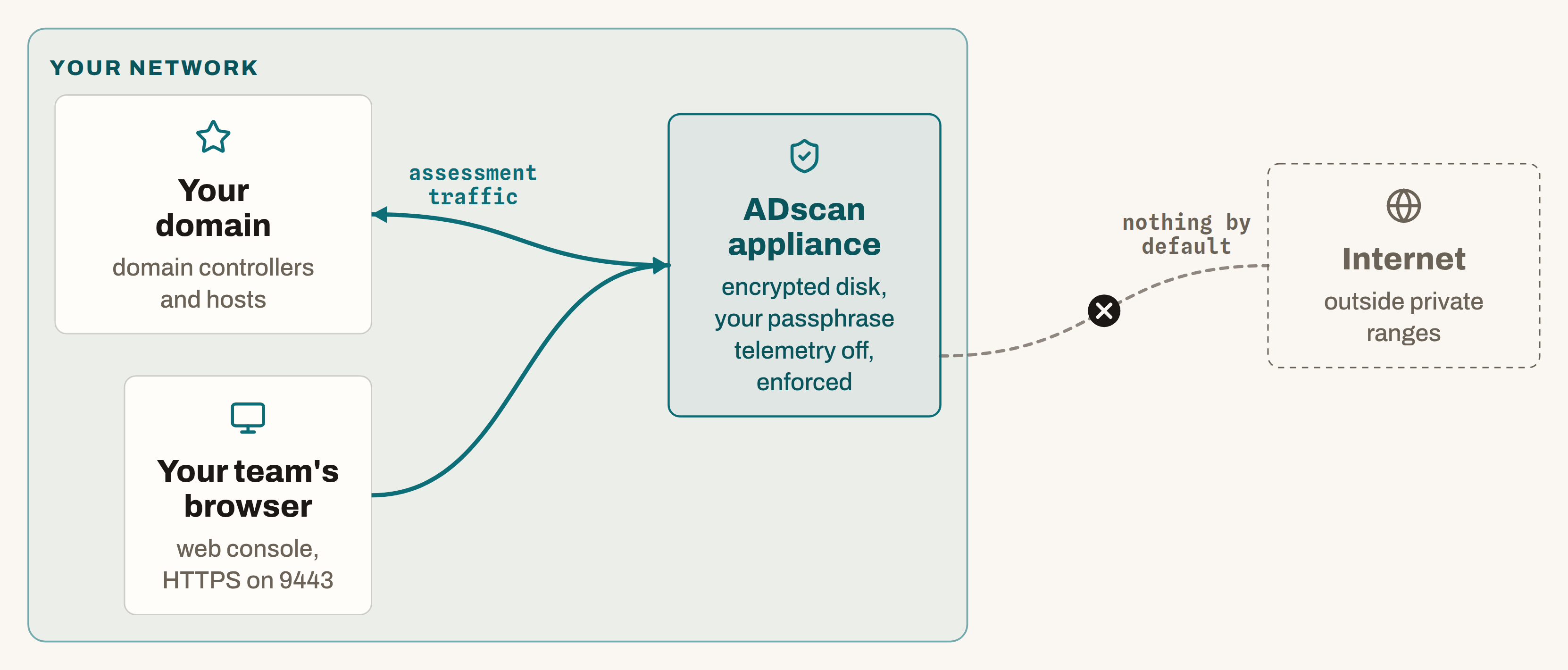
- Nothing goes out by default
- Every scan and the web platform run offline with telemetry off. The appliance sets it, and the settings page shows it as enforced and cannot change it.
- An outbound firewall on the appliance limits it to private address ranges, multicast and the DNS servers set at its console. Your administrator can allow more destinations, each with a stated reason, and a change not confirmed within two minutes is undone.
- Operating-system services that reach the internet are masked and network time is off. Online updates stay off until an administrator turns them on.
- The licence is a file signed by ADscan that an administrator uploads, checked on the appliance with no licence server.
- In a packet capture from first start through a full assessment, the appliance image sent nothing to an address outside private ranges.
- The disk is yours
- The disk is encrypted with LUKS2. At first start your team replaces our delivery passphrase with its own, and the data is re-encrypted under a new key generated on the appliance. The image we delivered no longer opens it.
- The disk opens only at the machine's own console. No service can open it over the network, and no network comes up before it is open. The appliance boots under UEFI with Secure Boot enforced.
- ADscan has no login on the appliance. SSH runs only while your team has turned on support access at the console, with a key generated for that session.
- Closed to the network by default
- An inbound firewall on the appliance drops everything it does not explicitly allow. It lets in the web console on TCP 9443, SSH on TCP 22 only while support access is on, and the listener ports of the assessment engine (TCP 80, 389, 443, 445, 636 and 8443, UDP 53, 137, 5353 and 5355).
- The console is served over TLS with a key generated on the appliance at first start, signed by a local certificate authority whose key is erased once it has signed. The image carries no private key.
- Secrets made and sealed on the appliance
- The database, session-signing, job-queue and credential-encryption secrets are generated on the appliance at first start. None of them ships in the image.
- The passwords the platform stores, such as scan accounts, cleanup accounts and two-step verification secrets, are encrypted with AES-256-GCM under a key kept outside the database.
- The policy you agreed is the one that runs
- The Lab / CTF policies are off as delivered. While they are off they are not offered and a launch under one is refused. Only an administrator turns them on, and each change goes to the audit log.
- Once a workspace records the policy agreed with you, only an administrator can launch a scan under another one, and only after confirming it.
- Every launch is recorded in the audit log with the policy it ran under and that policy's fingerprint.
The security and architecture sheet states every property with how it is checked. We send it to your security or procurement team on request.
Request the security packWhat ADscan reads, and what it never transmits.
Collection issues standard LDAP queries: the same data any authenticated domain user can already read. Nothing is exported or transmitted. Changes happen only in the validation steps your scan policy allows, and each one is reverted and checked.
Reads, on-prem only
- User and computer accounts (LDAP attributes)
- Group memberships and nested groups
- Group Policy Objects (GPOs)
- ACLs and delegation permissions
- ADCS certificate templates
- Kerberos delegation settings
- Trust relationships between domains
Never does
- Never sends AD data, credentials, or scan results outside your network
- Never modifies AD objects without operator confirmation
- Never stores credentials in the cloud
- Never requires internet connectivity (optional for license validation only)
- Never installs agents on any endpoint
- Never changes group policies or permissions
Audit-ready evidence, mapped to the frameworks your supervisor works from.
Each ADscan finding maps to the control it satisfies, so the report your supervisor sees is already in their language.
ENS Alto (CCN-CERT)
Report included- op.acc.1Identificación y autenticación
- op.acc.4Proceso de gestión de derechos de acceso
- op.exp.2Gestión de la configuración de seguridad
- mp.s.4Protección de servicios y aplicaciones web
ADscan generates traceable evidence mapped to each ENS Alto measure, ready for CCN-CERT audits.
NIS2 (Directive EU 2022/2555)
Report included- Art. 21(2)(a)Risk analysis and information system security
- Art. 21(2)(e)Network and information systems security
- Art. 21(2)(h)Cryptography and encryption
- Art. 21(2)(i)Human resources security and access control
Attack path reports line up with the risk-management measures set out in NIS2 Article 21.
ISO 27001:2022
Report included- A.5.17Authentication information
- A.5.18Access rights
- A.8.2Privileged access rights
- A.8.5Secure authentication
- A.8.8Management of technical vulnerabilities
ADscan findings map to Annex A controls and generate audit evidence for ISO 27001 certification bodies.
DORA (EU 2022/2554)
Report included- Art. 5ICT risk management framework
- Art. 9(2)ICT security policies and access control
- Art. 9(4)Identity management and MFA
- Art. 10Continuous detection of anomalies
DORA applies from January 2025. ADscan maps AD findings to DORA Chapter II requirements for banks, insurers, and investment firms.
GDPR / RGPD
By design- Art. 32Security of processing (technical measures)
- Recital 49Network and information security
ADscan is GDPR-compliant by design: 100% on-prem, no personal data transmitted, full data sovereignty.
Found something in ADscan itself?
If you discover a security vulnerability in ADscan, report it responsibly. We take security reports seriously and respond within 48 hours.
Validate your AD security posture, on your own terms.
100% on-prem. No cloud. We run ADscan live in your environment and deliver the full compliance report in the same session.